

VictorOps (Splunk On-Call)
The VictorOps notification channel triggers incidents in VictorOps (Splunk On-Call) when a detection fires. Alerts are routed to on-call teams using the REST Generic integration.
How It Works
- REST Generic Integration: Sends alerts via the VictorOps REST endpoint API
- Severity Mapping: Detection severity is automatically mapped to VictorOps message types (CRITICAL, WARNING, INFO)
- Incident Deduplication: Uses correlation IDs to group related alerts into a single incident
- Routing Keys: Alerts are directed to the appropriate escalation policy via routing keys
Setup Instructions
Step 1: Enable the REST Integration in VictorOps
- Log in to your VictorOps (Splunk On-Call) account
- Navigate to Settings > Alert Behavior > Integrations
- Find REST Generic in the integrations list and enable it
- Copy the API Key shown on the integration page -- you will need this when configuring RunReveal
Step 2: Note Your Routing Key
Routing keys determine which escalation policy and team receive the alert.
- In VictorOps, go to Settings > Alert Behavior > Routing Keys
- Find or create a routing key for RunReveal alerts
- Copy the routing key name
Step 3: Configure in RunReveal
- Go to Notification Channels
- Click Add Notification Channel
- Select VictorOps
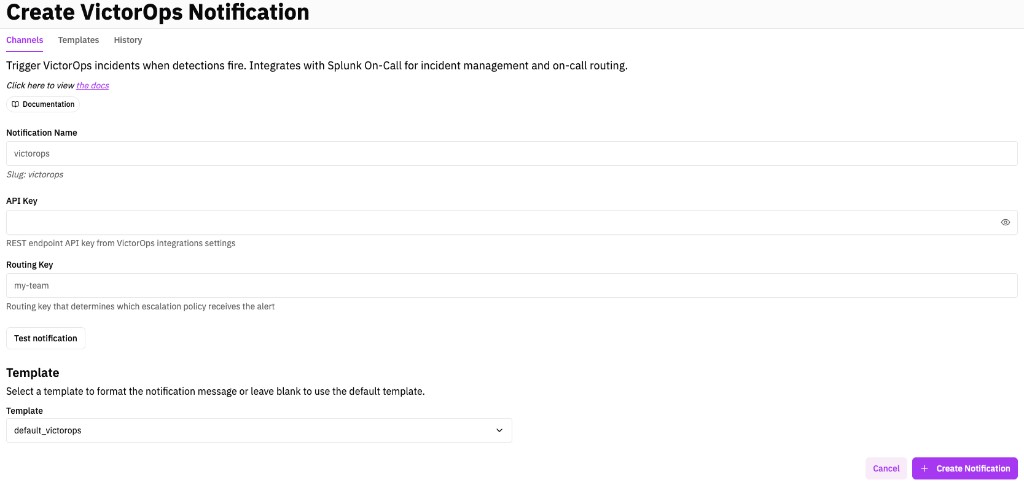
- Fill in the form:
- Display Name: A descriptive name (e.g., "VictorOps - Security Team")
- API Key: The REST endpoint API key from Step 1
- Routing Key: The routing key from Step 2
- Click Test Notification to verify the connection
- Click Create Notification to save
Step 4: Add to Detections
Add the notification channel to your detections individually, within sigma rules, or bulk-subscribe via the detection query library.
Severity Mapping
RunReveal automatically maps detection severity to VictorOps message types:
| Detection Severity | VictorOps Message Type |
|---|---|
| Critical | CRITICAL |
| High | CRITICAL |
| Medium | WARNING |
| Low | INFO |
Alert Format
Alerts sent to VictorOps include:
- Entity Display Name: The rendered notification title (typically the detection name)
- State Message: The rendered notification body with detection details
- Entity ID: A unique identifier for incident deduplication
- Monitoring Tool: Set to "RunReveal"
You can customize the title and body using notification templates.
Troubleshooting
Alert Not Appearing in VictorOps
- Verify your API key is correct -- it is embedded in the REST endpoint URL, not sent as a header
- Check that your routing key matches an existing routing key in VictorOps
- Review RunReveal's notification history for error messages
Wrong Team Receives the Alert
- Verify the routing key is mapped to the correct escalation policy in VictorOps
- Check Settings > Alert Behavior > Routing Keys in VictorOps
Duplicate Incidents
- RunReveal uses correlation IDs to deduplicate alerts into the same VictorOps incident
- If you see duplicates, check that the same detection is not configured with multiple notification channels pointing to VictorOps
Helpful Links
- REST Endpoint Integration for Splunk On-Call - Official Splunk On-Call REST API documentation
- Notification Templates - Customize alert content
- Getting Started with Notifications - Basic notification setup
- Notification History API - Track notification delivery