

Log Transforms
Transforms convert raw log data into RunReveal's normalized schema. Each transform contains one or more rules. Each rule is a linear chain of processors that ends with Output to Field.
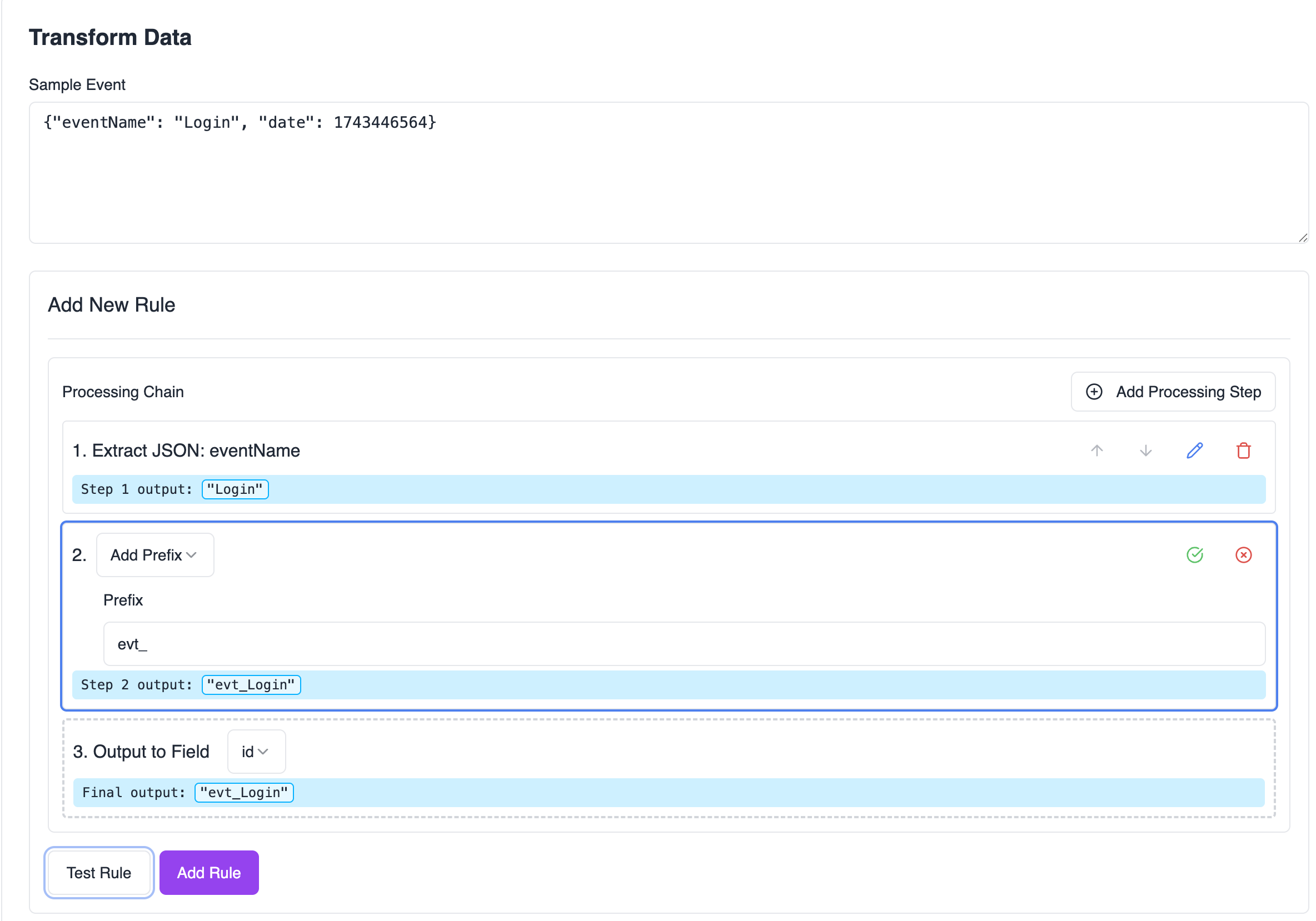
How processing works
Understanding what each step receives as input is the most important part of writing transforms.
- Every rule starts from the raw log — the full event string as ingested (usually JSON).
- Processors run in order — the output of step N becomes the input of step N+1.
- The final processor is always Output to Field — it writes the pipeline result to one normalized field (
actor.email,eventTime,tags, etc.). - Rules are independent — rule 2 does not see the output of rule 1; it also starts from the raw log.
Extract JSON Field requires valid JSON input. After you extract one field, the pipeline value is a plain string (for example John), not JSON. A second Extract JSON Field step on that value fails with invalid JSON input. To read multiple JSON fields in one rule, use Regex Find/Replace with capture groups, or create separate rules that each start from the raw log.
Example: single-rule flow
Raw log (sample event):
Rule: map eventName → eventName
| Step | Processor | Config | Input | Output |
|---|---|---|---|---|
| 1 | Extract JSON Field | eventName | {"userGivenName":"John",...} | user.login |
| 2 | Output to Field | eventName | user.login | (writes to normalized eventName) |
Available processors
The tables below use a shared sample where helpful. Step input is what the processor receives; Step output is what it passes to the next step.
Extract JSON Field (gjson)
Extracts a value from JSON using GJSON path syntax.
Config: GJSON Path (for example user.email, data.items.0.id, users.#.name)
| Step input | Config | Step output |
|---|---|---|
{"name":"John","age":30} | name | John |
{"user":{"name":"John","age":30}} | user.name | John |
{"users":["John","Jane","Bob"]} | users.1 | Jane |
{"users":[{"name":"John"},{"name":"Jane"}]} | users.#.name | ["John","Jane"] |
{"name":"John"} | address | (empty — path not found) |
not json | name | Error: invalid JSON input |
Extract Delimited Field (field)
Splits delimited text and returns the field at a zero-based index. Unlike Split String, this processor can respect quoted fields that contain the delimiter.
Config: Delimiter, Field Index, Quote Handling (none, single ', or double ")
| Step input | Config | Step output |
|---|---|---|
field1,field2,field3 | delimiter ,, index 0 | field1 |
field1, field2 , field3 | delimiter ,, index 1 | field2 |
"field1","field,2","field3" | delimiter ,, index 1, quotes " | "field,2" |
field1,field2,field3 | delimiter ,, index 5 | (empty — index out of range) |
Extract with Regex (regex)
Matches the input against a regex pattern and returns one capture group (or the full match if no group is selected).
Config: Regex Pattern, Capture Group (number or name), optional Match index for multiple matches
| Step input | Config | Step output |
|---|---|---|
hello world | pattern world | world |
hello world | pattern (hello) (world), group 2 | world |
hello world | pattern (?P<greeting>hello) (?P<subject>world), group subject | world |
hello world hello mars | pattern (hello) (\w+), match 1, group 2 | mars |
hello world | pattern xyz | (empty — no match) |
Add Prefix (prefix)
Prepends a static string.
Config: Prefix
| Step input | Config | Step output |
|---|---|---|
world | prefix hello | hello world |
hello | prefix (empty) | hello |
| (empty) | prefix hello | hello |
Add Suffix (suffix)
Appends a static string.
Config: Suffix
| Step input | Config | Step output |
|---|---|---|
hello | suffix world | hello world |
hello | suffix (empty) | hello |
| (empty) | suffix world | world |
Add Prefix and Add Suffix only accept static text. They cannot append the value of another JSON field. To join two dynamic fields, use Regex Find/Replace (below).
Convert to Lowercase (lowercase)
Config: none
| Step input | Step output |
|---|---|
HELLO WORLD | hello world |
HeLLo WoRLD | hello world |
Convert to Uppercase (uppercase)
Config: none
| Step input | Step output |
|---|---|
hello world | HELLO WORLD |
Regex Find/Replace (regexreplace)
Finds matches in the input and replaces them. Supports Go regexp capture references in the replacement string: $1, $2, etc.
Config: Find Pattern, Replace With
| Step input | Config | Step output |
|---|---|---|
hello123world | pattern \d+, replacement (empty) | helloworld |
hello123world | pattern (\d+), replacement [$1] | hello[123]world |
test123test456test | pattern \d+, replacement NUM | testNUMtestNUMtest |
hello world | pattern \d+, replacement NUM | hello world (no match — unchanged) |
Join two JSON fields into one value (for example actor.username):
| Step input | Config | Step output |
|---|---|---|
{"userGivenName":"John","userFamilyName":"Doe"} | pattern ^\s*\{.*"userGivenName"\s*:\s*"([^"]*)".*"userFamilyName"\s*:\s*"([^"]*)".*\}\s*$, replacement $1 $2 | John Doe |
The delimiter between $1 and $2 is whatever you put in Replace With — a space, underscore, @, etc.
Strip Characters (strip)
Removes every occurrence of the specified characters from the input.
Config: Characters to Strip
| Step input | Config | Step output |
|---|---|---|
hello123world | chars 123 | helloworld |
hello!@#world | chars !@# | helloworld |
hello...world | chars . | helloworld |
Trim Whitespace (trim)
Removes leading and trailing whitespace (spaces, tabs, newlines).
Config: none
| Step input | Step output |
|---|---|
hello world | hello world |
hello world | hello world |
Extract Substring (substring)
Returns a portion of the string by start/end index. Indices can be negative (count from the end). If end is omitted, it defaults to the end of the string.
Config: Start Index (optional), End Index (optional)
| Step input | Config | Step output |
|---|---|---|
hello world | start 0, end 5 | hello |
hello world | start 6 | world |
hello world | start -5 | world |
hello world | start 0, end -6 | hello |
hello world | start -5, end -1 | worl |
hello world | start 5, end 2 | (empty — start ≥ end) |
Split String (split)
Splits on a delimiter and returns the segment at the given index. Supports negative indices.
Config: Delimiter, Index to Take
| Step input | Config | Step output |
|---|---|---|
hello,world | delimiter ,, index 1 | world |
hello world | delimiter , index 0 | hello |
hello,world,test | delimiter ,, index -1 | test |
hello,world | delimiter ,, index 5 | (empty — index out of range) |
Format Date/Time (datetimeformat)
Parses a timestamp string and normalizes it to RFC3339 (for example 2021-01-01T00:00:00Z). Use before Output to Field → eventTime.
Config: Input Format
| Step input | Config | Step output |
|---|---|---|
1609459200 | @unix_s (Unix seconds) | 2021-01-01T00:00:00Z |
1609459200000 | @unix_m (Unix milliseconds) | 2021-01-01T00:00:00Z |
2021-01-01T00:00:00Z | RFC3339 | 2021-01-01T00:00:00Z |
01 Jan 21 00:00 UTC | RFC822 | 2021-01-01T00:00:00Z |
Fri Jan 01 00:00:00 2021 | ANSIC | 2021-01-01T00:00:00Z |
2023-10-15 | custom YYYY-MM-DD | 2023-10-15T00:00:00Z |
2023-10-15 14:30:45 | custom YYYY-MM-DD HH:mm:ss | 2023-10-15T14:30:45Z |
| (empty) | any format | current UTC time |
not-a-date | YYYY-MM-DD | Error: invalid time format |
Custom format tokens: YYYY, MM, DD, HH, hh, mm, ss, SSS, Z.
Output to Field (output)
Final step in every rule. Passes the pipeline value through unchanged and writes it to a normalized field when the transform is applied.
Config: Field Path (and Tag Key when field is tags)
| Pipeline value | Config | Normalized result |
|---|---|---|
user.login | eventName | eventName = "user.login" |
johndoe | actor.username | actor.username = "johndoe" |
[email protected] | actor.email | actor.email = "[email protected]" |
192.168.1.1 | src.ip | src.ip = "192.168.1.1" |
8080 | src.port | src.port = 8080 (parsed as number) |
true | readOnly | readOnly = true (parsed as boolean) |
2024-03-20T10:00:00Z | eventTime | eventTime set to that timestamp |
production | tags + key environment | tags["environment"] = "production" |
{"type":"document","id":"123"} | resources | JSON appended to resources array |
Available output fields: id, eventName, eventTime, readOnly, actor.id, actor.email, actor.username, src.ip, src.port, dst.ip, dst.port, service.name, resources, tags.
Each normalized field (except tags and resources) can only be targeted by one rule per transform. Use tags with different keys for additional custom values.
Full pipeline examples
Map a JSON field to actor.email
Raw log:
| Step | Processor | Config | Output |
|---|---|---|---|
| 1 | Extract JSON Field | userEmail | [email protected] |
| 2 | Convert to Lowercase | — | [email protected] |
| 3 | Output to Field | actor.email | (normalized) |
Parse a CSV-style log line to eventName
Raw log:
| Step | Processor | Config | Output |
|---|---|---|---|
| 1 | Extract Delimited Field | delimiter ,, index 1 | user.login |
| 2 | Output to Field | eventName | (normalized) |
Concatenate userGivenName + userFamilyName → actor.username
Raw log:
| Step | Processor | Config | Output |
|---|---|---|---|
| 1 | Regex Find/Replace | pattern ^\s*\{.*"userGivenName"\s*:\s*"([^"]*)".*"userFamilyName"\s*:\s*"([^"]*)".*\}\s*$, replacement $1 $2 | John Doe |
| 2 | Output to Field | actor.username | (normalized) |
Unix timestamp → eventTime
Raw log:
| Step | Processor | Config | Output |
|---|---|---|---|
| 1 | Extract JSON Field | ts | 1609459200 |
| 2 | Format Date/Time | @unix_s | 2021-01-01T00:00:00Z |
| 3 | Output to Field | eventTime | (normalized) |
Building an effective pipeline
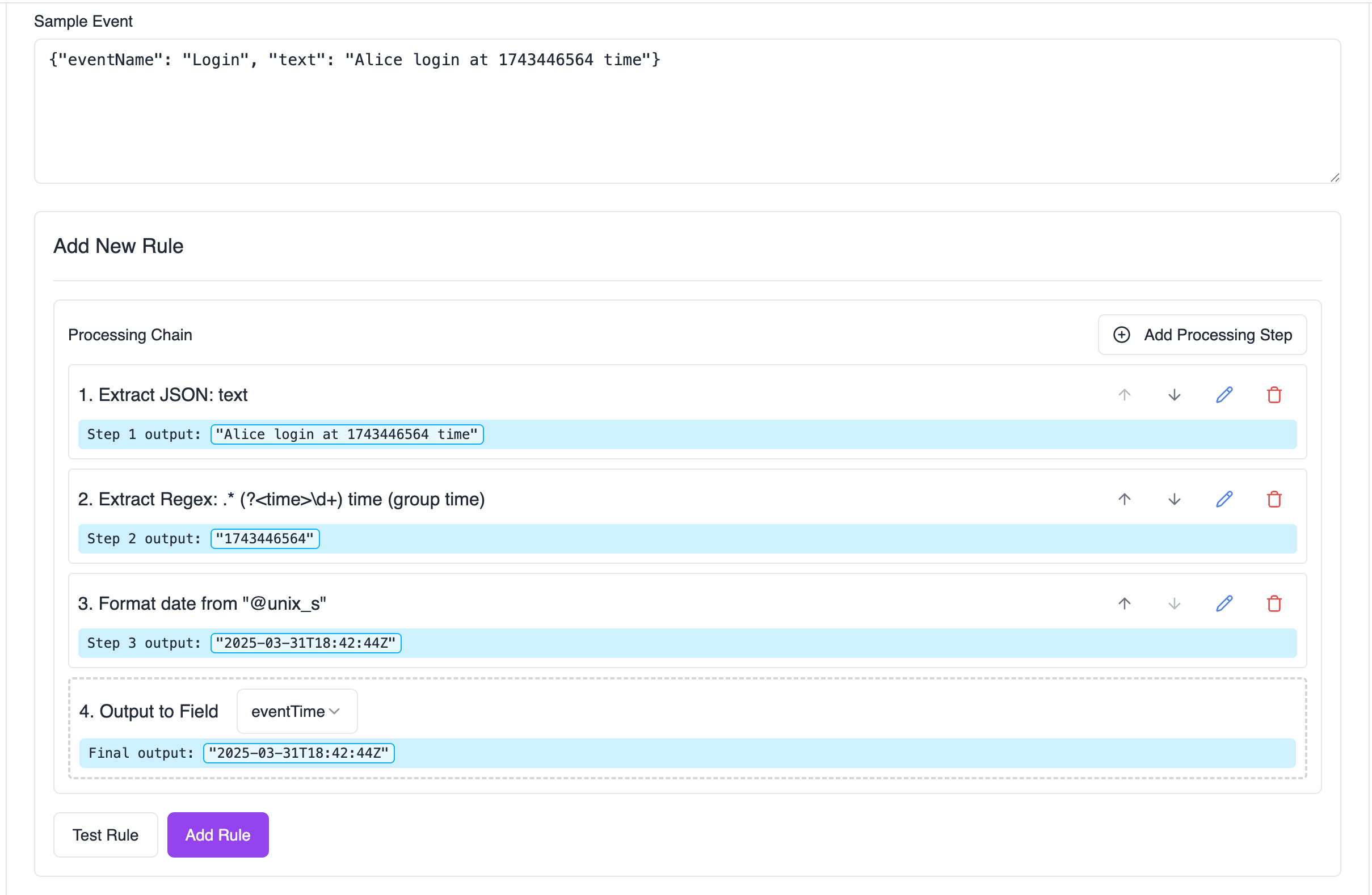
- Extract — Use Extract JSON Field, Extract with Regex, or Extract Delimited Field on the raw log.
- Clean and format — Trim, case conversion, strip unwanted characters, substring/split.
- Transform dates — Format Date/Time before writing to
eventTime. - Map to schema — Output to Field.
Add and test one processor at a time using Test Rule in the transform editor.
Testing your transform
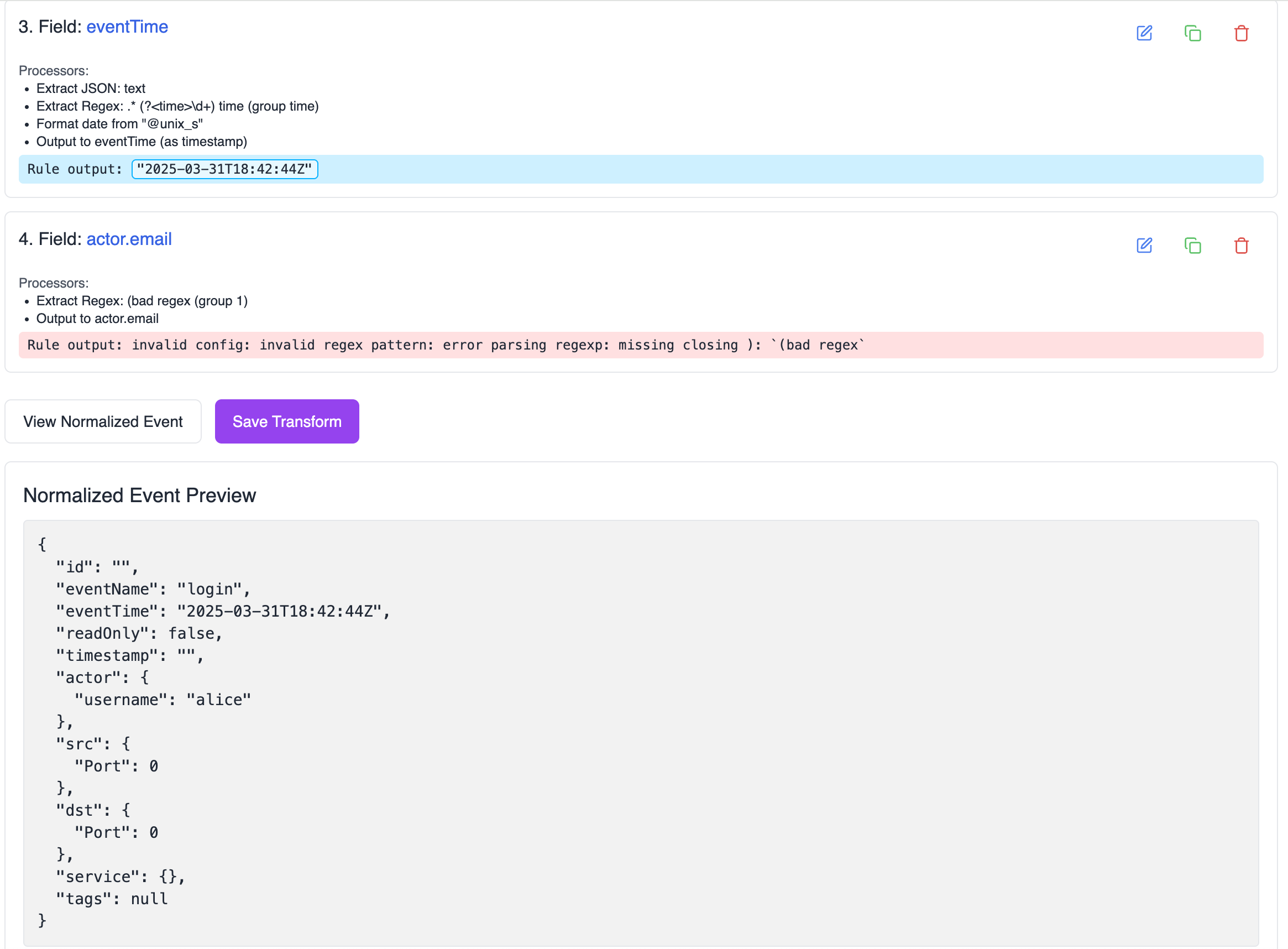
- Paste a representative event into Sample Event.
- Click Test Rule to run the current rule. Each step shows its output; errors appear in red (for example
invalid JSON input). - Click View Normalized Event to see the full normalized event after all rules run.
Troubleshooting
| Symptom | Likely cause | Fix |
|---|---|---|
invalid JSON input on step 2+ | Prior step returned a plain string; Extract JSON Field needs JSON | Use Regex Find/Replace to combine fields, or start a new rule from the raw log |
| Empty step output | Path/group/index not found | Verify GJSON path, regex group, or delimiter index against sample data |
invalid time format | Input does not match selected date format | Match Input Format to the actual string; use Test Rule to iterate |
| Field not in normalized output | Missing Output step, wrong field name, or field already used by another rule | End every rule with Output to Field; check for duplicate field assignments |
| Concatenation not working | Chained Extract JSON Field + Add Suffix | Use Regex Find/Replace with $1 $2 instead |
Related documentation
- Custom Source field mapping — wizard-based mapping that creates transforms automatically
- Sources — attach transforms to sources during setup