

Queries
Query System: RunReveal uses ClickHouse as its query engine, giving you access to powerful SQL capabilities for analyzing your log data. All queries support parameterized syntax for flexible, reusable query patterns.
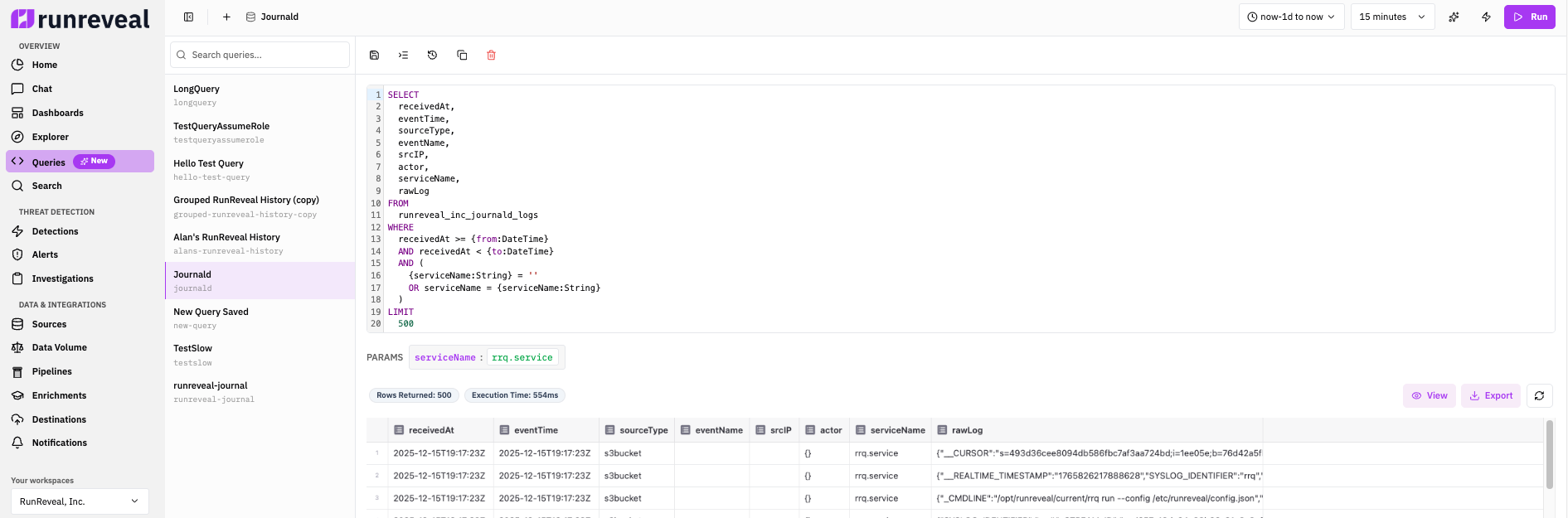
Quick Start
Every RunReveal query follows this basic structure with built-in time parameters:
Key Points:
- Use
`{from:DateTime}`and`{to:DateTime}`for time filtering (automatically set by the UI) - Always use
receivedAtfor time-based queries (it's indexed and handles delayed logs) - Include
LIMITto control result size - Use source-specific views like
aws_cloudtrail_logsinstead oflogswhen possible
Query History
Every query you run in Explore is saved to Query History so you can revisit SQL, reload results, and share runs with teammates.
Open the panel from the Explore toolbar: click the history (circular arrow) icon next to Run. The panel opens beside the editor and lists recent runs.

Tabs
| Tab | Who can see it | What it shows |
|---|---|---|
| My Queries | Everyone | Queries you ran |
| All | Admins | Queries run by anyone in the workspace |
| Async | Everyone | Your long-running / background query runs |
Search and filters
- Search queries… — Filter the list by text in the SQL (or AI / PQL text when present).
- Status filter — Narrow to Any, Running, Completed, Error, or Cancelled.
Use the refresh control in the panel header to reload the list. Scroll to load more entries (history pages in batches).
Each history entry
Collapsed rows show a one-line SQL preview, how long ago the query started, status (when not completed), and row count for successful runs.
Click a row to expand the full query with syntax highlighting. From the row actions (visible on hover) you can:
| Action | What it does |
|---|---|
| View results | Reload stored results for a completed run that still has results |
| Paste into editor | Copy the query (and parameters) into the current editor so you can edit and re-run |
| Copy shareable link | Copy a URL that opens the query (or its stored results) in Explore |
| Cancel | Stop a query that is still Running |
Query History is your recent run log. For named, reusable queries you iterate on over time, use Saved Queries in Explore instead.
Built-in Parameters
RunReveal automatically provides time-based parameters that are populated based on your time range selection in the UI.
{from:DateTime} - Start time (inclusive){to:DateTime} - End time (exclusive){interval:UInt32} - Time bucket in seconds{window:UInt32} - Window duration (default: 14400){paramName:Type} syntaxExample Query with Parameters
Timestamp Fields: receivedAt vs eventTime
Always use receivedAt for time filtering. It's indexed, handles delayed logs, and ensures consistent query performance across all sources.
✓ receivedAt (Recommended)
⚠ eventTime
For how RunReveal sets these fields and infrastructure NTP, see Explore Logs — Timestamps and clock synchronization.
Best Practice Example
Query Optimization
Follow these best practices to write fast, efficient queries:
Query optimized views like aws_cloudtrail_logs instead of the generic logs table.
Apply filters on indexed fields (receivedAt, sourceType, sourceID) first to reduce dataset size before processing.
Start with 1 hour to test, then expand. Shorter windows process much faster than 30-day ranges.
Prevent processing excessive data by including LIMIT in every query.
Prefer COUNT, GROUP BY over returning all individual events.
When querying the logs table, always include sourceType filter.
Optimizing WHERE Clause Order
Order your WHERE clause filters to match the table's organization. Start with the most specific filters (source type), then narrow by time, and finally add other conditions.
Primary Key Fields (use in this order):
sourceType- Filter by source type first (e.g.,'okta','box','github')sourceID- Include if filtering by a specific source instancereceivedAt- Always include your time range filter
Additional Indexed Fields (use after primary key):
eventTime- When the event occurredsrcIPordstIP- IP addresses (efficient for filtering)actormap values - User informationrawLog- For searching inside raw log data
Example - Optimized Query:
Why This Order Works:
ClickHouse uses the primary key to efficiently prune data. Filtering by sourceType first narrows the dataset to a single source, then receivedAt uses the time-ordered index to skip irrelevant time ranges. Other filters can leverage their indexes after the primary key filters have reduced the dataset size.
Common Pattern:
Most queries should follow this pattern:
Always include sourceType and receivedAt first, then add your specific filters. This pattern ensures optimal query performance.
Common Query Patterns
View Common Query Patterns
ClickHouse Functions Reference
View ClickHouse Functions
Complete Reference: RunReveal uses ClickHouse as its query engine. For a complete list of all available functions, see the ClickHouse Functions Documentation.
toYear(), toMonth(), toHour()toStartOfHour(), toStartOfDay()dateDiff(), formatDateTime()match(), LIKE, extract()splitByChar(), upper(), lower()trim(), replace()arrayJoin(), length(), has()hasAny()map['key'] - Access map valuesmapKeys(), mapValues()has(map, 'key')COUNT(), sum(), avg()quantile(), groupArray()min(), max()if(), multiIf(), coalesce()JSONExtractString(), JSONHas()Common Mistakes to Avoid
❌ Common Mistakes
eventTime for time filteringLIMIT clauselogs without sourceType filterSELECT * with GROUP BY✅ Best Practices
receivedAt for time filteringLIMITsourceType when using logs tableQuick Performance Tips
- Start Small: Test with 1-hour windows before expanding
- Use EXPLAIN: Check execution plans when optimizing
- Monitor Query Time: Watch execution times in the UI
- Index Usage: Filter on indexed columns (receivedAt, sourceType, sourceID)
- Avoid Full Scans: Always include time range filters
- Limit Aggregations: Use LIMIT even with GROUP BY
Related Documentation
- Explore Logs - Learn how to use the query interface and saved queries
- Writing Detections - Create detection rules from queries
- ClickHouse Documentation - Complete ClickHouse reference
- ClickHouse Functions - All available functions