

Fireblocks
Collect audit logs from your Fireblocks digital asset custody platform to monitor user actions and security events.
Fireblocks audit logs provide visibility into user actions, configuration changes, and security events within your Fireblocks workspace. RunReveal polls the Fireblocks API every 1 minute to retrieve your audit logs.
Setup
To set up your Fireblocks source, you'll need to create an API user in your Fireblocks Console and generate API credentials.
Creating an API User
- Log in to your Fireblocks Console and navigate to Developer Center → API Users
- Click Add API User and provide a meaningful name for the API user
- Give the API user a unique name and assign the "Non-signing Admin" role.
- Select "Automatic CSR" if you want fireblocks to generate a private key for you, or "Custom CSR" to upload your own.
- Download the generated private key if using Automatic CSR and store if for later.
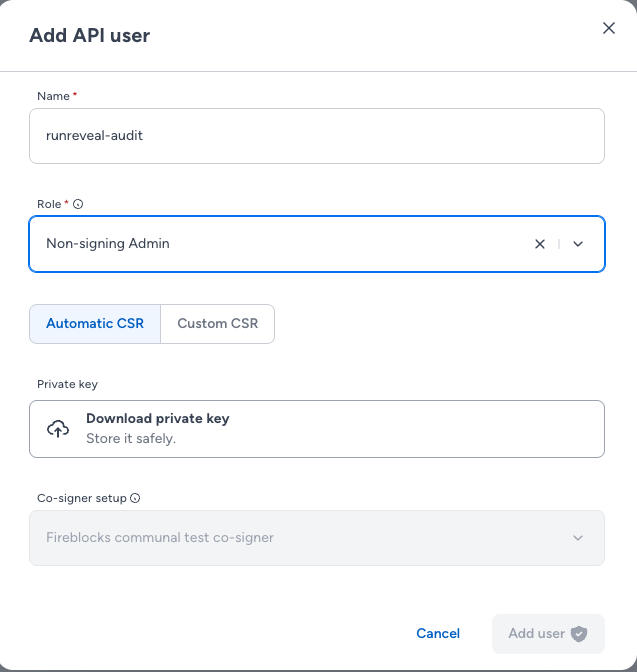
- Add the new user. In the API user list, copy the "API User (ID)" for later setup.

Configuring RunReveal
-
In RunReveal, navigate to Sources and click Add Source
-
Search for Fireblocks and select it
-
Enter a name for your source
-
Select your Environment:
- US Sandbox - For sandbox/testing workspaces
- US Mainnet - For US production workspaces
- EU Mainnet - For EU production workspaces
- EU2 Mainnet - For EU2 production workspaces
-
Enter the API Key from your Fireblocks Console, this is your "API User (ID)"
-
Upload the fireblocks secret key file (
fireblocks_secret.key)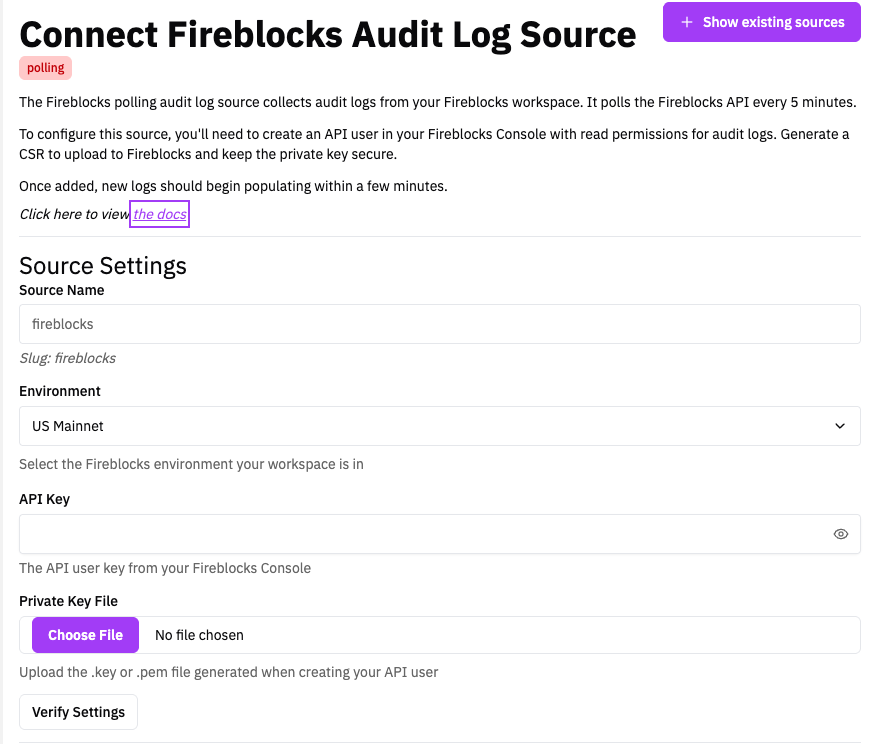
-
Verify the source is working
-
Click Create Source
Verify It's Working
Once added, audit logs should begin flowing within a few minutes.
You can validate we are receiving your logs by running the following SQL query:
Or use the dedicated view for Fireblocks-specific fields:
Schema
The following columns are exposed for this source. RunReveal applies schema normalization across all sources, ensuring uniform field names and data types for cross-source queries and reusable detection logic.
Table: fireblocks_audit_logs (44 columns)
fireblocks_audit_logs (44 columns)| Column | Type |
|---|---|
workspaceID | String |
sourceID | String |
sourceType | String |
sourceTTL | UInt32 |
receivedAt | DateTime |
id | String |
eventTime | DateTime |
eventName | String |
eventID | String |
srcIP | String |
srcASCountryCode | String |
srcASNumber | UInt32 |
srcASOrganization | String |
srcCity | String |
srcConnectionType | String |
srcISP | String |
srcLatitude | Float64 |
srcLongitude | Float64 |
srcUserType | String |
dstIP | String |
dstASCountryCode | String |
dstASNumber | UInt32 |
| Column | Type |
|---|---|
dstASOrganization | String |
dstCity | String |
dstConnectionType | String |
dstISP | String |
dstLatitude | Float64 |
dstLongitude | Float64 |
dstUserType | String |
actor | Map(String, String) |
tags | Map(String, String) |
resources | Array(String) |
serviceName | String |
enrichments | Array(Tuple(data Map(String, String), name String, provider String, type String, value String)) |
readOnly | Bool |
rawLog | String |
fireblocksId | String |
fireblocksTimestamp | DateTime64(3) |
fireblocksCreatedAt | DateTime64(3) |
fireblocksUser | String |
fireblocksSubject | String |
fireblocksEvent | String |
fireblocksTenantId | String |
fireblocksUserId | String |