

Google Cloud Platform (GCP) Logs
GCP logs provide comprehensive monitoring and logging across all Google Cloud services through Cloud Logging. These logs capture various types of data, including system events, API calls, network traffic, resource access, and performance metrics. GCP logs are essential for tracking user activity, monitoring infrastructure, troubleshooting issues, auditing security and compliance, and optimizing the performance of Google Cloud resources.
Ingest Methods
GCP Logs can be ingested three ways:
| Method | Latency | Best for |
|---|---|---|
| Google Cloud Storage | Up to ~1 hour (batched files) | High volume, lower cost |
| Google Cloud Pub/Sub Queue | Near real-time (RunReveal pulls the subscription) | Logs already on Pub/Sub without a GCS bucket |
| Webhook | Near real-time (GCP pushes to RunReveal) | Lowest latency when push delivery is acceptable |
GCS buckets are inherently cheaper than push-based delivery, but logs can be delayed by up to an hour while Google batches files. Webhook and Pub/Sub Queue ingestion import logs as they arrive; push/webhook delivery can cost more at very high volume.
Setup
After creating your cloud storage bucket and other resources needed to receive events, you will need to setup a GCP log router to forward logs to the bucket.
GCP Log Router Sink Setup
Navigate to the GCP Log router setup page to create a new sink.
You can setup a logging sink for a single project or your entire organization and forward logs to the bucket created.
Create a new logging sink giving it a name, choose Cloud Storage bucket as the sink service. Enter the bucket information that was created as the destination bucket.
Add an optional inclusion or exclusion filter to limit the logs that are forwarded by this logging sink.
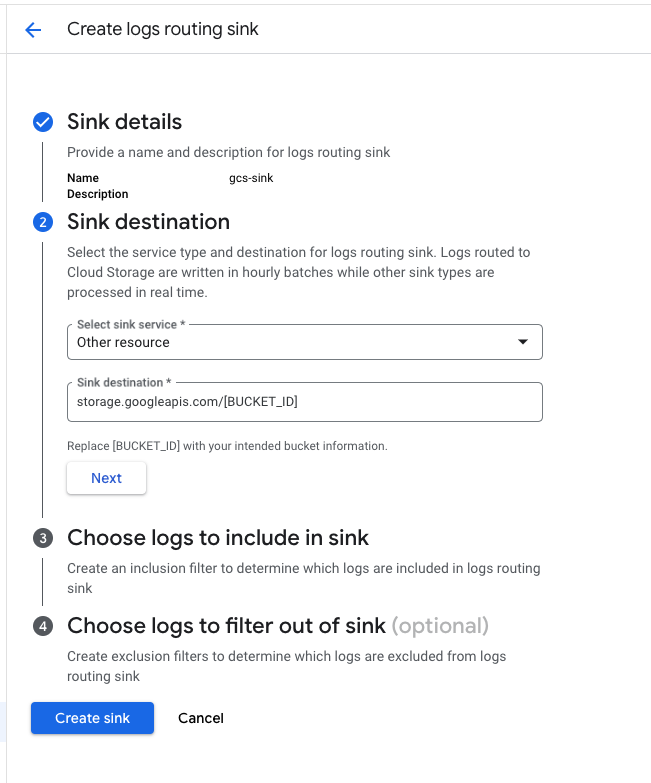
When routing logs directly to cloud storage, Google will batch the logs and write them to a file every hour. It may take some time before you see any logs start to show up in the bucket.
Verify It's Working
Once added the source logs should begin flowing within a minute (up to an hour for batched GCS delivery).
You can validate we are receiving your logs by running the following SQL query.
Schema
The following columns are exposed for this source. RunReveal applies schema normalization across all sources, ensuring uniform field names and data types for cross-source queries and reusable detection logic.
Table: gcp_logs (60 columns)
gcp_logs (60 columns)| Column | Type |
|---|---|
workspaceID | String |
sourceID | String |
sourceType | LowCardinality(String) |
sourceTTL | UInt32 |
receivedAt | DateTime |
id | String |
eventTime | DateTime |
eventName | String |
eventID | String |
srcIP | String |
srcASCountryCode | String |
srcASNumber | UInt32 |
srcASOrganization | String |
srcCity | String |
srcConnectionType | String |
srcISP | String |
srcLatitude | Float64 |
srcLongitude | Float64 |
srcUserType | String |
dstIP | String |
dstASCountryCode | String |
dstASNumber | UInt32 |
dstASOrganization | String |
dstCity | String |
dstConnectionType | String |
dstISP | String |
dstLatitude | Float64 |
dstLongitude | Float64 |
dstUserType | String |
actor | Map(String, String) |
| Column | Type |
|---|---|
tags | Map(String, String) |
resources | Array(String) |
serviceName | String |
enrichments | Array(Tuple(data Map(String, String), name String, provider String, type String, value String)) |
readOnly | Bool |
rawLog | String |
insertId | String |
logName | String |
textPayload | String |
payloadType | String |
methodName | String |
resourceName | String |
payloadServiceName | String |
severity | String |
resourceType | String |
principalEmail | String |
principalSubject | String |
authorizationInfo | Array(String) |
projectID | String |
subscriptionID | String |
resourceLabels | Array(Tuple(String, String)) |
callerIp | String |
callerSuppliedUserAgent | String |
requestPayload | String |
responsePayload | String |
payloadMetadataType | String |
metadataEvents | Array(String) |
bindingDeltas | Array(String) |
jsonPayloadMessage | String |
jsonPayloadPID | String |