

CrowdStrike Event Stream
The CrowdStrike Event Stream provides a continuous flow of real-time security events and telemetry data generated by the CrowdStrike Falcon platform. This stream captures critical information such as detected threats, endpoint activity, and alert notifications. Organizations can leverage the Event Stream for immediate threat analysis, integrating with SIEM systems, or creating custom dashboards for enhanced visibility and response to security incidents.
RunReveal ingests CrowdStrike logs using the Falcon streaming events service. Every 60 seconds RunReveal connects to your CrowdStrike event streams and ingests any new events that are forwarded. This data is far less detailed than the Falcon Data Replicator source.
Prerequisites
Before connecting CrowdStrike to RunReveal, you need:
- Access to the CrowdStrike Falcon console with permission to create OAuth2 API clients.
- Knowledge of which CrowdStrike cloud your tenant runs in (US-1, US-2, EU-1, or US GovCloud). The console displays the Base URL when you create an API client.
Access
RunReveal authenticates with an OAuth2 API client. Create the client with the minimum scopes for the data you want to collect.
| Scope | Required | Purpose |
|---|---|---|
Event Streams: Read | Yes | Ingest streaming events (detections, incidents, audit, IOC, firewall, CSPM, and more) |
Alerts: Read | Optional | Enables the EDR Alerts endpoint for richer v2 detection payloads |
The default Event Streams: Read scope is the minimum required to ingest streaming events.
Infrastructure
CrowdStrike operates several regional clouds, each with its own API base URL. Government clouds do not support region auto-discovery, so the Base URL is required. Use the exact Base URL displayed when you create your API client.
| Cloud | API Base URL |
|---|---|
| US-1 | https://api.crowdstrike.com |
| US-2 | https://api.us-2.crowdstrike.com |
| EU-1 | https://api.eu-1.crowdstrike.com |
| US GovCloud 1 | https://api.laggar.gcw.crowdstrike.com |
| US GovCloud 2 | https://api.us-gov-2.crowdstrike.mil |
If you are unsure which cloud you use, the Base URL is shown on the API client screen in the Falcon console immediately after you create the client. Copy it exactly into the API Base URL field in RunReveal.
Setup
Step 1: Create an OAuth2 API Client
- Log in to your CrowdStrike Falcon console and navigate to API clients and keys under Support and resources.

- Create a new OAuth2 API Client. Give the client a name and optional description, and grant the scopes from Access — at minimum
Event Streams: Read.
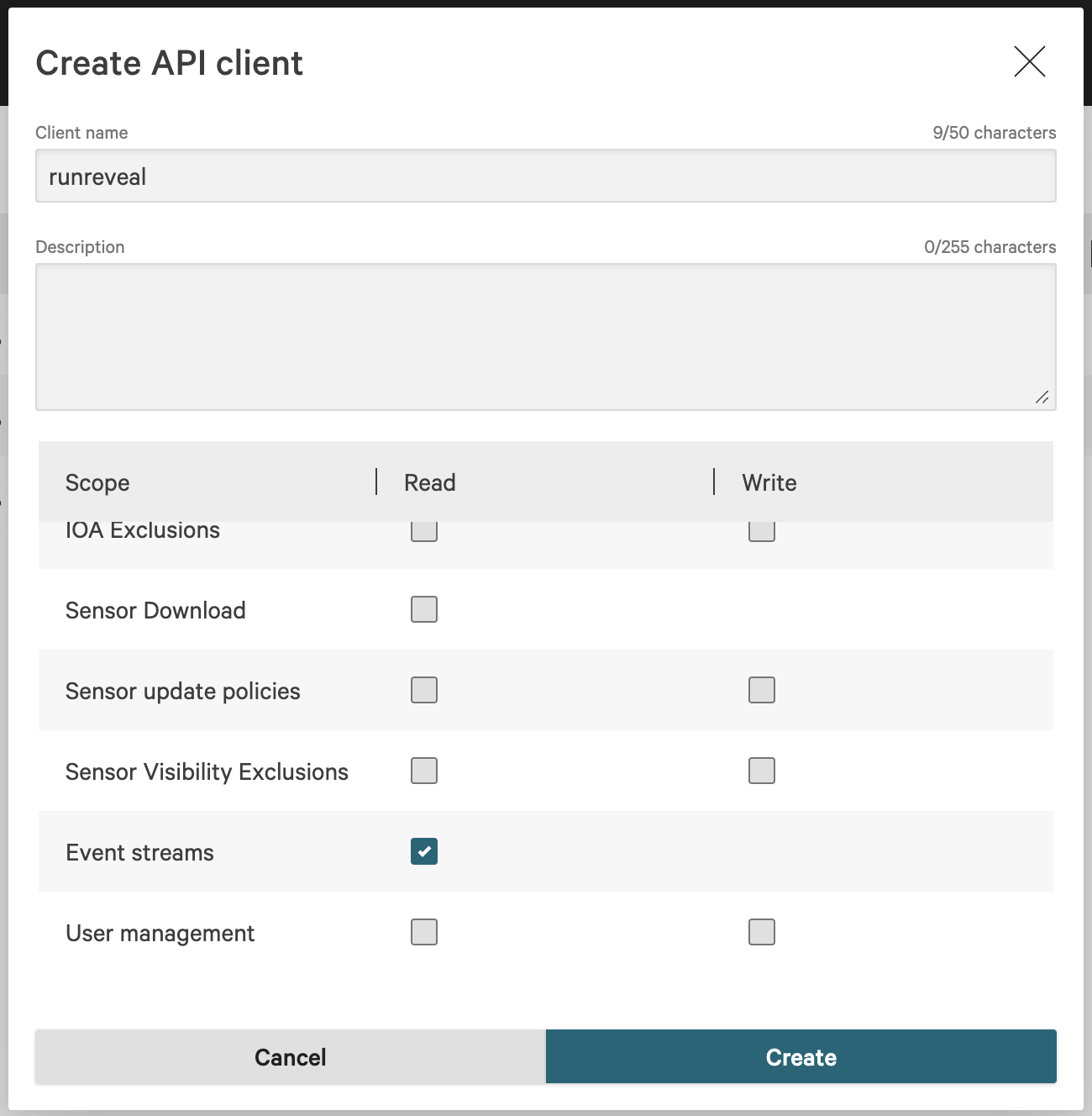
Step 2: Save Your Credentials
Save the Client ID, Client Secret, and Base URL that are displayed once the client is created. You will need all three when setting up your RunReveal source.

Step 3: Connect to RunReveal
- In RunReveal, create a new CrowdStrike source.
- Give it a name and fill in the Client ID and Client Secret from your API client.
- Enter the API Base URL from Infrastructure — copy the Base URL exactly as shown in the Falcon console (this is how GovCloud tenants are routed correctly).
- (Optional) Toggle Enable EDR Alerts if your API key has the
Alerts: Readscope.
Once added, CrowdStrike events should start ingesting within a few minutes.
Optional: EDR Alerts
The CrowdStrike source can additionally poll the Falcon v2 alerts endpoint, which returns richer detection data than the streaming feed alone.
| Toggle | Endpoint | Required scope | What it provides |
|---|---|---|---|
| Enable EDR Alerts | POST /alerts/entities/alerts/v2 | Alerts: Read | Full v2 alert payloads with MITRE ATT&CK mappings, ThreatGraph indicators, process lineage (parent + child with SHA256, cmdline, user SID), and a direct falcon_host_link for console pivot. |
To enable this, edit your CrowdStrike API key in the Falcon console and grant the Alerts: Read scope, then toggle Enable EDR Alerts on the source settings page.
EDR alert events land in the same crowdstrike_event_logs table as streaming events and can be distinguished by serviceName = 'crowdstrike-alerts'.
If the toggle is enabled but the API key lacks the Alerts: Read scope, the source logs a warning each poll cycle and skips the alerts endpoint — streaming events continue to flow.
Verify It's Working
Once added the source logs should begin flowing within a minute.
You can validate we are receiving your logs by running the following SQL query.
Schema
The following columns are exposed for this source. RunReveal applies schema normalization across all sources, ensuring uniform field names and data types for cross-source queries and reusable detection logic.
Table: crowdstrike_event_logs (49 columns)
crowdstrike_event_logs (49 columns)| Column | Type |
|---|---|
workspaceID | String |
sourceID | String |
sourceType | String |
sourceTTL | UInt32 |
receivedAt | DateTime |
id | String |
eventTime | DateTime |
eventName | String |
eventID | String |
srcIP | String |
srcASCountryCode | String |
srcASNumber | UInt32 |
srcASOrganization | String |
srcCity | String |
srcConnectionType | String |
srcISP | String |
srcLatitude | Float64 |
srcLongitude | Float64 |
srcUserType | String |
dstIP | String |
dstASCountryCode | String |
dstASNumber | UInt32 |
dstASOrganization | String |
dstCity | String |
dstConnectionType | String |
| Column | Type |
|---|---|
dstISP | String |
dstLatitude | Float64 |
dstLongitude | Float64 |
dstUserType | String |
actor | Map(String, String) |
tags | Map(String, String) |
resources | Array(String) |
serviceName | String |
enrichments | Array(Tuple(data Map(String, String), name String, provider String, type String, value String)) |
readOnly | Bool |
rawLog | String |
success | Bool |
utcTimestamp | DateTime |
message | String |
source | String |
apiClientId | String |
cid | String |
requestMethod | String |
requestPath | String |
statusCode | String |
userAgent | String |
traceId | String |
elapsedMicroseconds | String |
region | String |
Helpful Links
- CrowdStrike Falcon API base URLs and regions — Official list of cloud regions, base URLs, and GovCloud auto-discovery behavior
- CrowdStrike Event Streams API — Reference for the streaming endpoint RunReveal connects to
- Falcon Data Replicator source — A more detailed CrowdStrike telemetry source if you need full endpoint data