

PlanetScale Audit Logs
The PlanetScale source polls your organization's audit logs every 60 seconds using a service token. Audit logs capture administrative actions such as database creation and deletion, branch operations, user access changes, and password management.
On the first poll RunReveal will ingest the most recent page of audit events (up to 200). Subsequent polls will continuously fetch any new events that have occurred since the last check.
Setup
Step 1: Create a PlanetScale Service Token
Service tokens are the recommended way to grant RunReveal API access without tying credentials to a specific user account.
- Sign in to your PlanetScale dashboard.
- Navigate to your organization settings.
- Select Service tokens from the left-hand navigation.
- Click New service token.
- Give the token a descriptive name such as
RunReveal. - After the token is created, copy both the Token ID and the Token secret — the secret is only shown once.
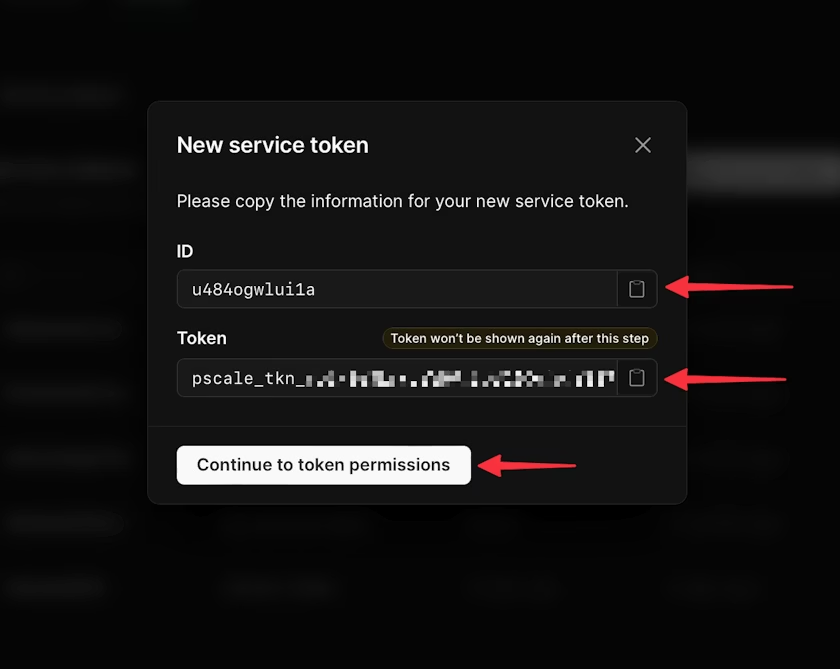
Save the token secret immediately after creation. PlanetScale will not show it again.
Step 2: Grant the Required Permission
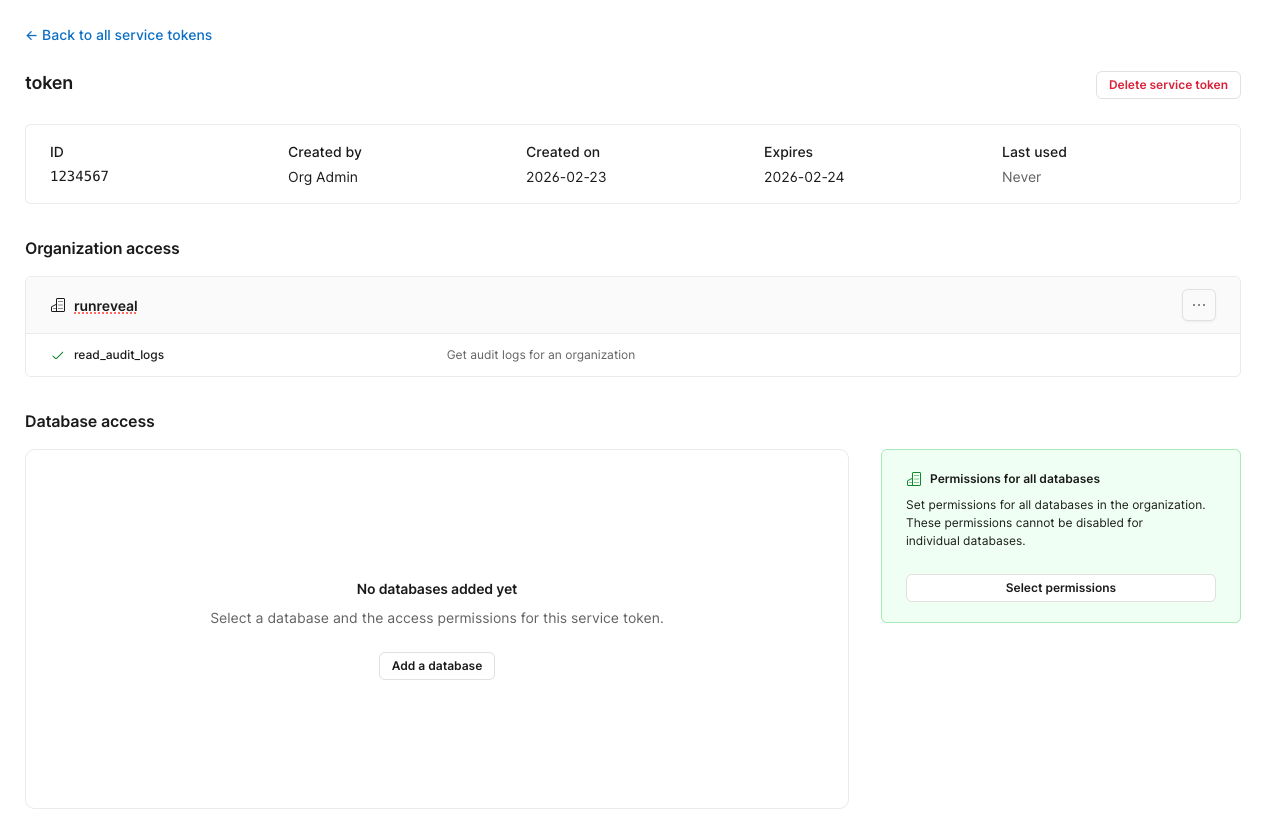
Once the token is created you need to grant it access to read audit logs.
- From the Service tokens page, find your newly created token and click on it.
- Under Organization permissions, click Add permission.
- Enable the
audit_logs_readpermission. - Save your changes.
Step 3: Add the Source in RunReveal
- Navigate to Sources in RunReveal.
- Find the PlanetScale tile and click it.
- Fill in the following fields:
| Field | Description |
|---|---|
| Organization Name | Your PlanetScale organization name (found in the URL: app.planetscale.com/<org-name>) |
| Service Token ID | The token ID copied from Step 1 |
| Service Token Secret | The token secret copied from Step 1 |
- Click Create to save the source.
Verify It's Working
Once added, logs should begin flowing within a minute. You can validate data is arriving by running:
Schema
The following columns are exposed for this source. RunReveal applies schema normalization across all sources, ensuring uniform field names and data types for cross-source queries and reusable detection logic.
Table: planetscale_logs (53 columns)
planetscale_logs (53 columns)| Column | Type |
|---|---|
workspaceID | String |
sourceID | String |
sourceType | String |
sourceTTL | UInt32 |
receivedAt | DateTime |
id | String |
eventTime | DateTime |
eventName | String |
eventID | String |
srcIP | String |
srcASCountryCode | String |
srcASNumber | UInt32 |
srcASOrganization | String |
srcCity | String |
srcConnectionType | String |
srcISP | String |
srcLatitude | Float64 |
srcLongitude | Float64 |
srcUserType | String |
dstIP | String |
dstASCountryCode | String |
dstASNumber | UInt32 |
dstASOrganization | String |
dstCity | String |
dstConnectionType | String |
dstISP | String |
dstLatitude | Float64 |
| Column | Type |
|---|---|
dstLongitude | Float64 |
dstUserType | String |
actor | Map(String, String) |
tags | Map(String, String) |
resources | Array(String) |
serviceName | String |
enrichments | Array(Tuple(data Map(String, String), name String, provider String, type String, value String)) |
readOnly | Bool |
rawLog | String |
psId | String |
psAuditAction | String |
psAction | String |
psActorId | String |
psActorType | String |
psActorDisplayName | String |
psAuditableId | String |
psAuditableType | String |
psAuditableDisplayName | String |
psTargetId | String |
psTargetType | String |
psTargetDisplayName | String |
psLocation | String |
psRemoteIp | String |
psCreatedAt | String |
psUpdatedAt | String |
psMetadata | String |
Helpful Links
- PlanetScale Audit Log API Reference - Full API documentation for the audit log endpoint
- PlanetScale Service Tokens - How to create and manage service tokens