

Zoom
The Zoom source ingests events from Zoom Marketplace Event Subscriptions. RunReveal generates a webhook URL when you create the source; you point a Zoom Marketplace app at that URL and choose which events to subscribe to.
Zoom emits dozens of event types (meeting, webinar, recording, chat, phone, user, account, operation logs, etc.). RunReveal accepts every event your Zoom app is subscribed to and stores the full payload in rawLog. The zoom_logs view extracts the most commonly used fields up front.
Setup
This source uses an HTTP webhook to ingest events. Create the source in RunReveal and a webhook URL will be generated for you. You will use that URL when configuring your Zoom Marketplace app.
You will need to create a Zoom Marketplace General App in Admin-Managed mode so that the subscription applies to every user in your account. Keep the app in Development mode while you're integrating — you don't need to publish it.
Create a new General App
In the Zoom App Marketplace, click Develop -> Build App and choose General App.
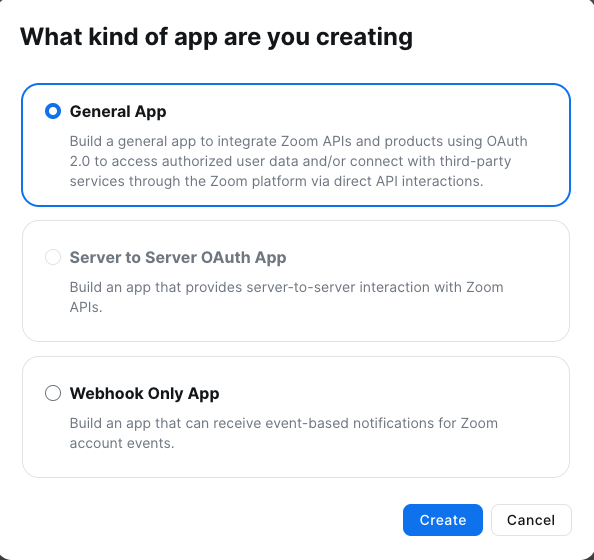
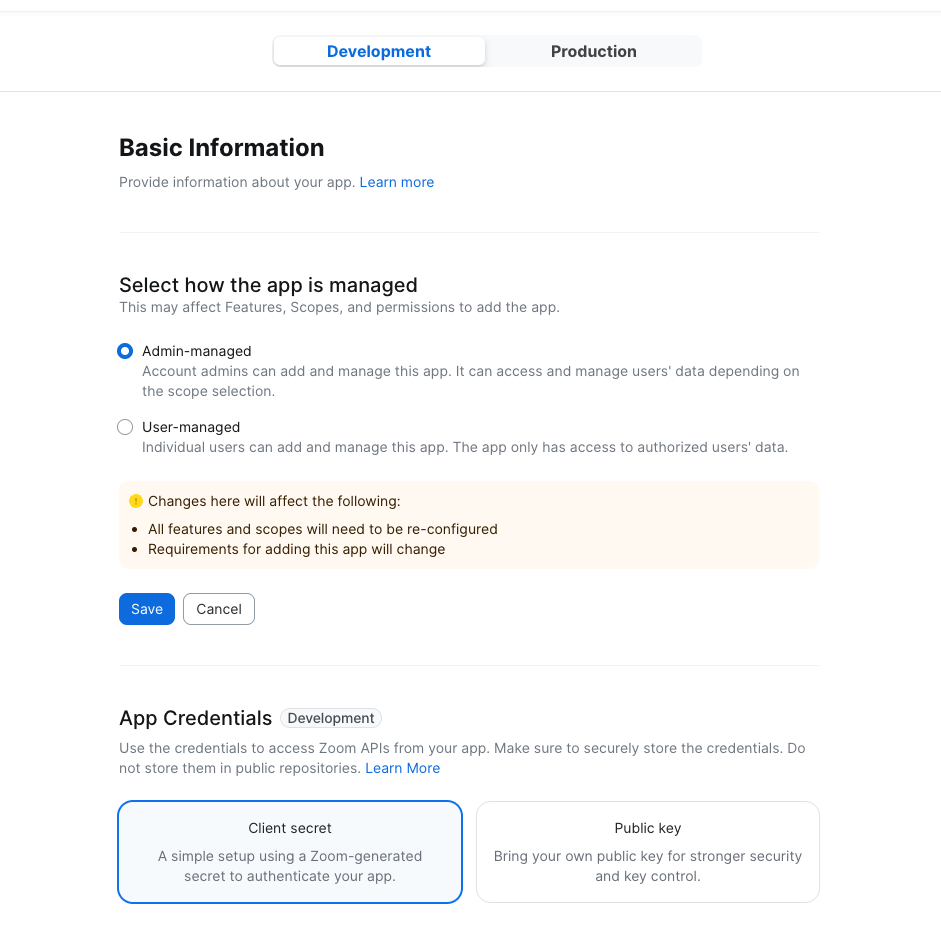
Set the app to Development + Admin-Managed
On the Basic Information tab:
- At the top of the page, switch the app type selector to Development.
- For How is this app managed?, choose Admin-managed.
- Click Save to apply the changes before moving on — Zoom won't persist the rest of the form until you save this section.
Set an OAuth redirect URL
Scroll down on the Basic Information page to the OAuth Information section and enter a value for OAuth Redirect URL. Zoom requires this field even though RunReveal does not use OAuth for webhooks — any URL works. We use https://runreveal.com in the screenshot.
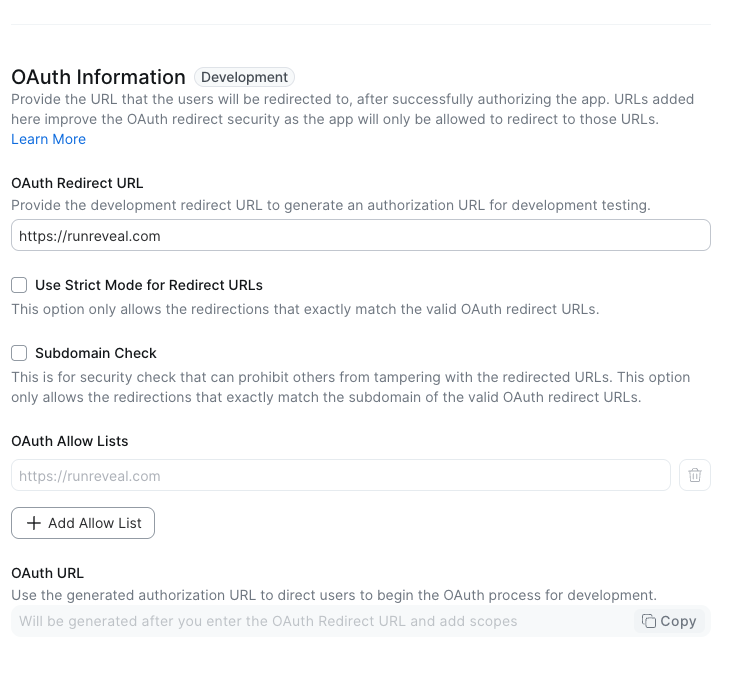
The redirect URL is part of Zoom's OAuth flow. Because RunReveal authenticates webhooks via the Secret Token (or accepts them anonymously), this field has no operational impact for this integration.
Copy the Secret Token, then add an Event Subscription
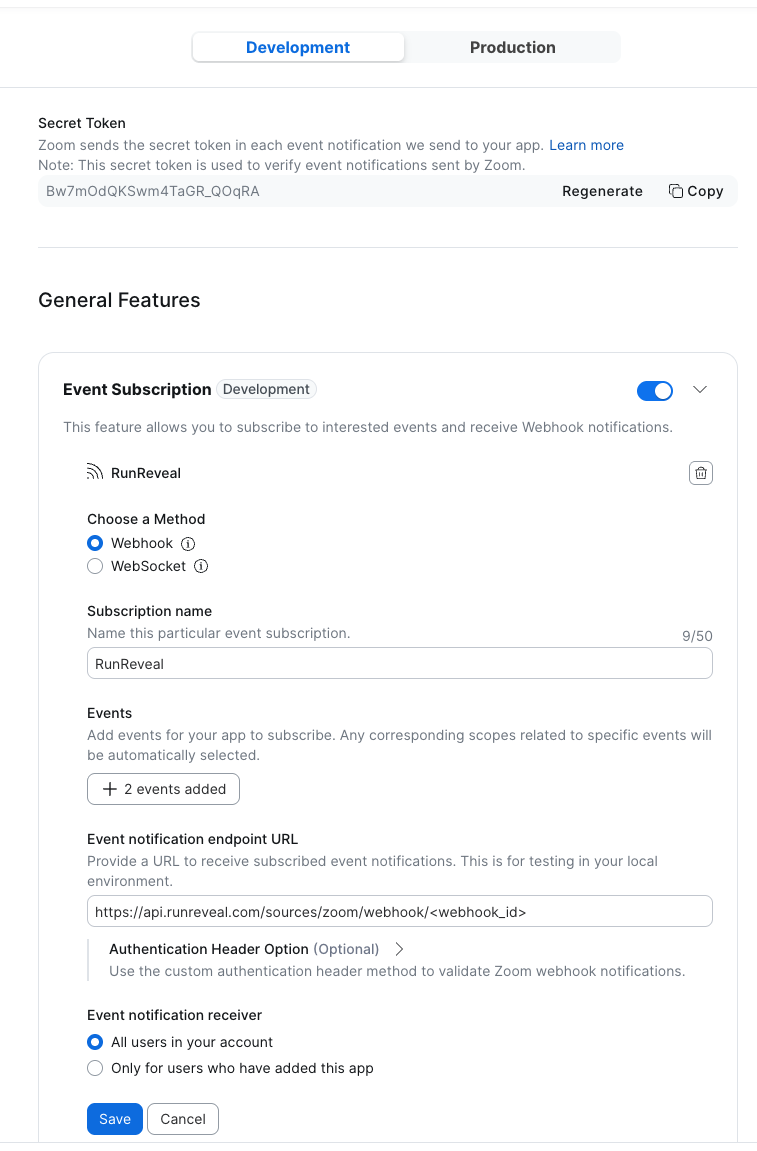
Open the Access tab in the sidebar. Near the top of this page Zoom shows your app's Secret Token — copy it now; you'll paste it into the RunReveal source in the next step.
In the same Access page, enable Event Subscriptions and click Add Event Subscription. Configure it as follows:
- Method: Webhook
- Subscription name: anything memorable (e.g.
RunReveal) - Event notification endpoint URL: the Webhook URL from your RunReveal Zoom source (see next step — you can come back here and paste it)
- Notify the user about: select All users in your account
- Add events: choose every event you want to ingest. Common picks include:
- Meeting:
meeting.started,meeting.ended,meeting.participant_joined,meeting.participant_left - Recording:
recording.started,recording.completed - User:
user.signed_in,user.signed_out,user.created,user.deactivated,user.deleted - Account:
account.settings_updated - Operation logs:
information_barriers.role_changed, etc.
- Meeting:
Create the RunReveal Zoom source
In RunReveal, go to Sources -> Add Source -> Zoom. Give the source a name and paste the Secret Token you copied from Zoom into the Secret Token field. Save the source — your unique Webhook URL is then displayed at the top of the source's edit screen.
Copy the webhook URL and paste it into the Event notification endpoint URL field of the Zoom subscription you started in the previous step, then save the subscription in Zoom.
The Secret Token isn't strictly required, but if you provide it RunReveal verifies the x-zm-signature header on every incoming request using HMAC-SHA256. Leaving it blank accepts all webhooks (Zoom transport is HTTPS-only).
Install the app on your account
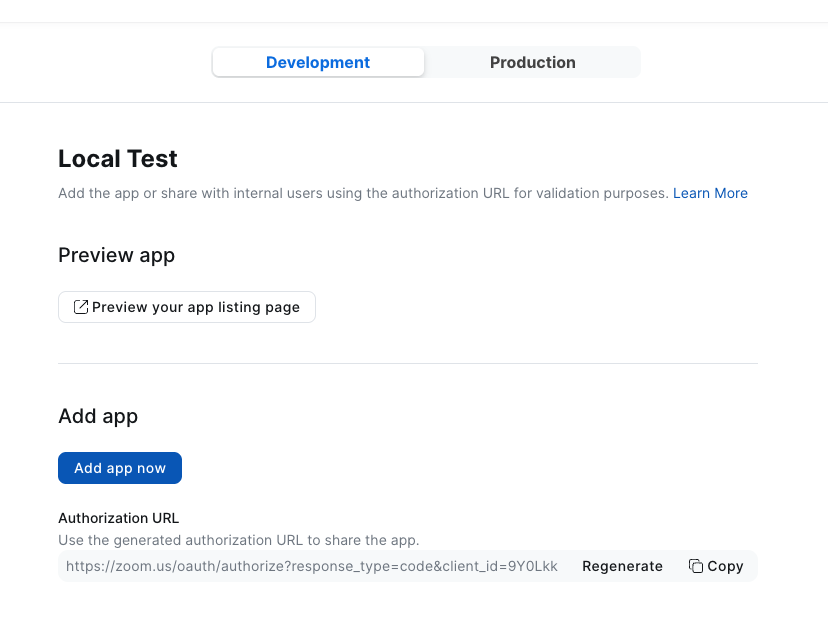
Open the Add your app tab (under Local Test) and click Add App Now. Approve the requested permissions to install the app on your Zoom account. Until you do this, Zoom won't deliver any events.
(Optional) Skip the Validate URL button
Zoom shows a Validate URL button next to the endpoint URL. RunReveal does not implement Zoom's URL validation challenge response — webhooks still flow to your source even if the URL shows as "not validated". You can safely skip that button while the app is in Development mode.
Verify It's Working
Once the subscription is saved, trigger an event (start a meeting, sign in, etc.) and confirm RunReveal received it:
Or query the typed view:
Schema
The following columns are exposed for this source. RunReveal applies schema normalization across all sources, ensuring uniform field names and data types for cross-source queries and reusable detection logic.
Table: zoom_logs (61 columns)
zoom_logs (61 columns)| Column | Type |
|---|---|
workspaceID | String |
sourceID | String |
sourceType | String |
sourceTTL | UInt32 |
receivedAt | DateTime |
id | String |
eventTime | DateTime |
eventName | String |
eventID | String |
srcIP | String |
srcASCountryCode | String |
srcASNumber | UInt32 |
srcASOrganization | String |
srcCity | String |
srcConnectionType | String |
srcISP | String |
srcLatitude | Float64 |
srcLongitude | Float64 |
srcUserType | String |
dstIP | String |
dstASCountryCode | String |
dstASNumber | UInt32 |
dstASOrganization | String |
dstCity | String |
dstConnectionType | String |
dstISP | String |
dstLatitude | Float64 |
dstLongitude | Float64 |
dstUserType | String |
actor | Map(String, String) |
tags | Map(String, String) |
| Column | Type |
|---|---|
resources | Array(String) |
serviceName | String |
enrichments | Array(Tuple(data Map(String, String), name String, provider String, type String, value String)) |
readOnly | Bool |
rawLog | String |
zoomEventTSMillis | Int64 |
zoomAccountID | String |
zoomObjectID | String |
zoomObjectUUID | String |
zoomObjectType | Int32 |
zoomTopic | String |
zoomHostID | String |
zoomHostEmail | String |
zoomEmail | String |
zoomStartTime | String |
zoomEndTime | String |
zoomTimezone | String |
zoomDuration | Int32 |
zoomClientType | String |
zoomVersion | String |
zoomLoginType | Int32 |
zoomDateTime | String |
zoomParticipantID | String |
zoomParticipantUserID | String |
zoomParticipantUserName | String |
zoomParticipantEmail | String |
zoomParticipantPublicIP | String |
zoomParticipantPrivateIP | String |
zoomParticipantLeaveTime | String |
zoomParticipantLeaveReason | String |
Helpful Links
- Zoom webhook reference — Official documentation for the webhook envelope, signatures, and event taxonomy.
- Build an Admin-Managed app — Marketplace app creation guide.
- Event Subscription reference — Configuring which events your app receives.