

Harbor
Collect audit logs from your Harbor container registry to monitor image pushes and pulls, project and member changes, and other registry activity.
Ingest Methods
RunReveal offers the following ways to ingest Harbor logs:
API Polling
The Harbor source polls your registry's audit log API every 5 minutes. It collects image pushes and pulls, project and member changes, and other registry activity.
Setup
Use a Harbor system admin user, or a robot account with system-level audit log permissions, so RunReveal can read registry-wide activity. Robot account names include a dollar sign, for example robot$runreveal. A project-scoped account can connect, but it only returns the activity that account can see.
- Go to Sources and select Harbor.
- On Connect Harbor Source, enter a source name, the Harbor URL, username, and password. The Harbor URL is the base URL of your instance, for example
https://harbor.example.com. RunReveal appends the API path.
Turn on Skip TLS certificate verification only if the instance uses a self-signed or otherwise untrusted certificate. That disables TLS validation for requests to this Harbor instance.
Click Verify Settings, then connect the source.
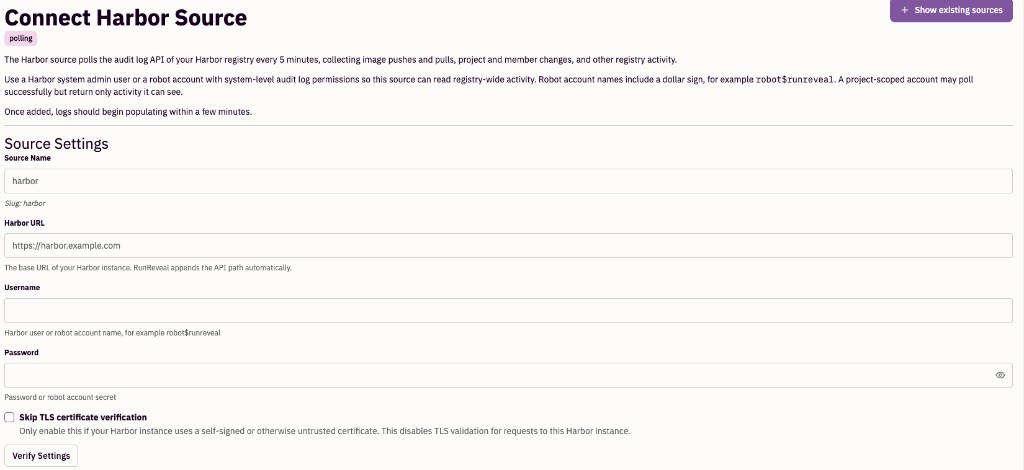
Once the source is added, logs should begin populating within a few minutes. RunReveal starts from recent activity at the time you connect.
Schema
The following columns are exposed for this source. RunReveal applies schema normalization across all sources, ensuring uniform field names and data types for cross-source queries and reusable detection logic.
Table: harbor_audit_logs (43 columns)
harbor_audit_logs (43 columns)| Column | Type |
|---|---|
workspaceID | String |
sourceID | String |
sourceType | String |
sourceTTL | UInt32 |
receivedAt | DateTime |
id | String |
eventTime | DateTime |
eventName | String |
eventID | String |
srcIP | String |
srcASCountryCode | String |
srcASNumber | UInt32 |
srcASOrganization | String |
srcCity | String |
srcConnectionType | String |
srcISP | String |
srcLatitude | Float64 |
srcLongitude | Float64 |
srcUserType | String |
dstIP | String |
dstASCountryCode | String |
dstASNumber | UInt32 |
| Column | Type |
|---|---|
dstASOrganization | String |
dstCity | String |
dstConnectionType | String |
dstISP | String |
dstLatitude | Float64 |
dstLongitude | Float64 |
dstUserType | String |
actor | Map(String, String) |
tags | Map(String, String) |
resources | Array(String) |
serviceName | String |
enrichments | Array(Tuple(data Map(String, String), name String, provider String, type String, value String)) |
readOnly | Bool |
rawLog | String |
harborID | String |
harborResource | String |
harborResourceType | String |
harborOperation | String |
harborOperationDescription | String |
harborOperationResult | String |
harborUsername | String |