

Salesforce Event Logs
Capture detailed information about user activities, system operations, and performance metrics within a Salesforce organization.

Setup
Salesforce Event Logs supports API polling to collect event logs from your Salesforce organization using OAuth 2.0 client credentials. The setup steps are the same as for Salesforce Audit Trail; you can use the same Connected App credentials for both Event Logs and Audit Trail if you want to run both sources.
API and polling: We use Salesforce API v65.0. Backfill is limited to 30 days. RunReveal checks Salesforce about every minute. The Polling Interval setting is which EventLogFile cadence we query (Daily or Hourly), not how often we call the API. New sources default to Daily.
Salesforce generates those files on a delay (this is Salesforce, not RunReveal):
- Hourly files: typically 3–6 hours after the events. See Query or View Hourly Event Log Files.
- Daily files: generated the next day during non-peak hours, so data is unavailable for at least 1 day. See Using Event Monitoring.
Hourly logs require an add-on: Hourly EventLogFiles require the Salesforce Event Monitoring add-on with hourly logging enabled. Most orgs only have Daily logs available by default. If you do not have this add-on, set the Polling Interval to Daily in the source configuration.
Step 1: Create the External Client App
- In Salesforce, go to Setup (click the gear icon)
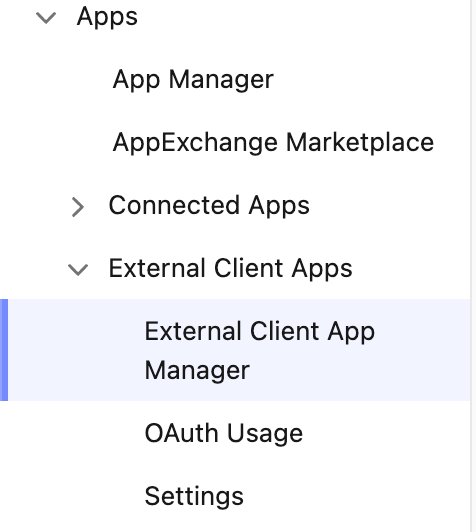
- In the Quick Find box, search for "External Client App Manager" (or go to Apps → External Client Apps → External Client App Manager in the sidebar)
- Click "New External Client App" in the top right
- Fill in the basic information:
- Connected App Name: Your integration name (e.g. "RunReveal")
- API Name: (auto-fills based on the name)
- Contact Email: Your email

Step 2: Configure OAuth Settings
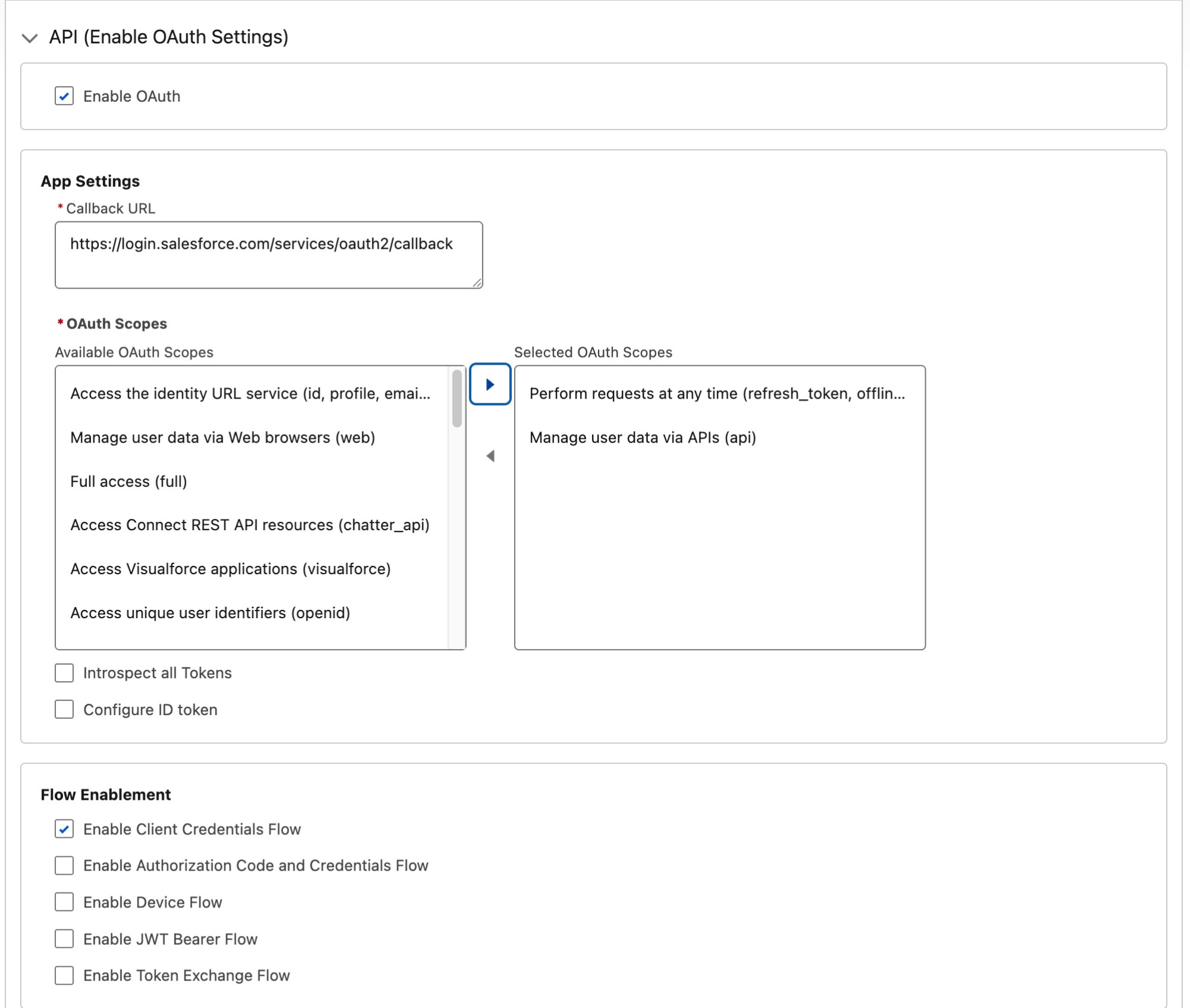
- Check "Enable OAuth Settings"
- Set Callback URL to:
https://login.salesforce.com/services/oauth2/callback(or your specific callback URL if different) - Under Selected OAuth Scopes, add:
- Perform requests at any time (
refresh_token,offline_access) - Manage user data via APIs (
api)
- Perform requests at any time (
- Check "Enable Client Credentials Flow"
- Click "Create"
Step 3: Enable Client Credentials Flow
- Edit the app you just created
- Check "Enable Client Credentials Flow"
- In the "Run As" field, search for and select the execution user
The Run As user must have "API Enabled", "View Event Log Files", and "View All Data" permissions.
View Event Log Files is what grants access to the EventLogFile object. The Event Monitoring Analytics
permission sets and licenses only grant the prebuilt CRM Analytics app — they do not grant access to the object
itself. Without View Event Log Files, Salesforce hides EventLogFile from that user entirely rather than
returning a permission error, and log collection stops.

Step 4: Save and Retrieve Credentials
- Click "Save"
- Click "Continue" on the confirmation page
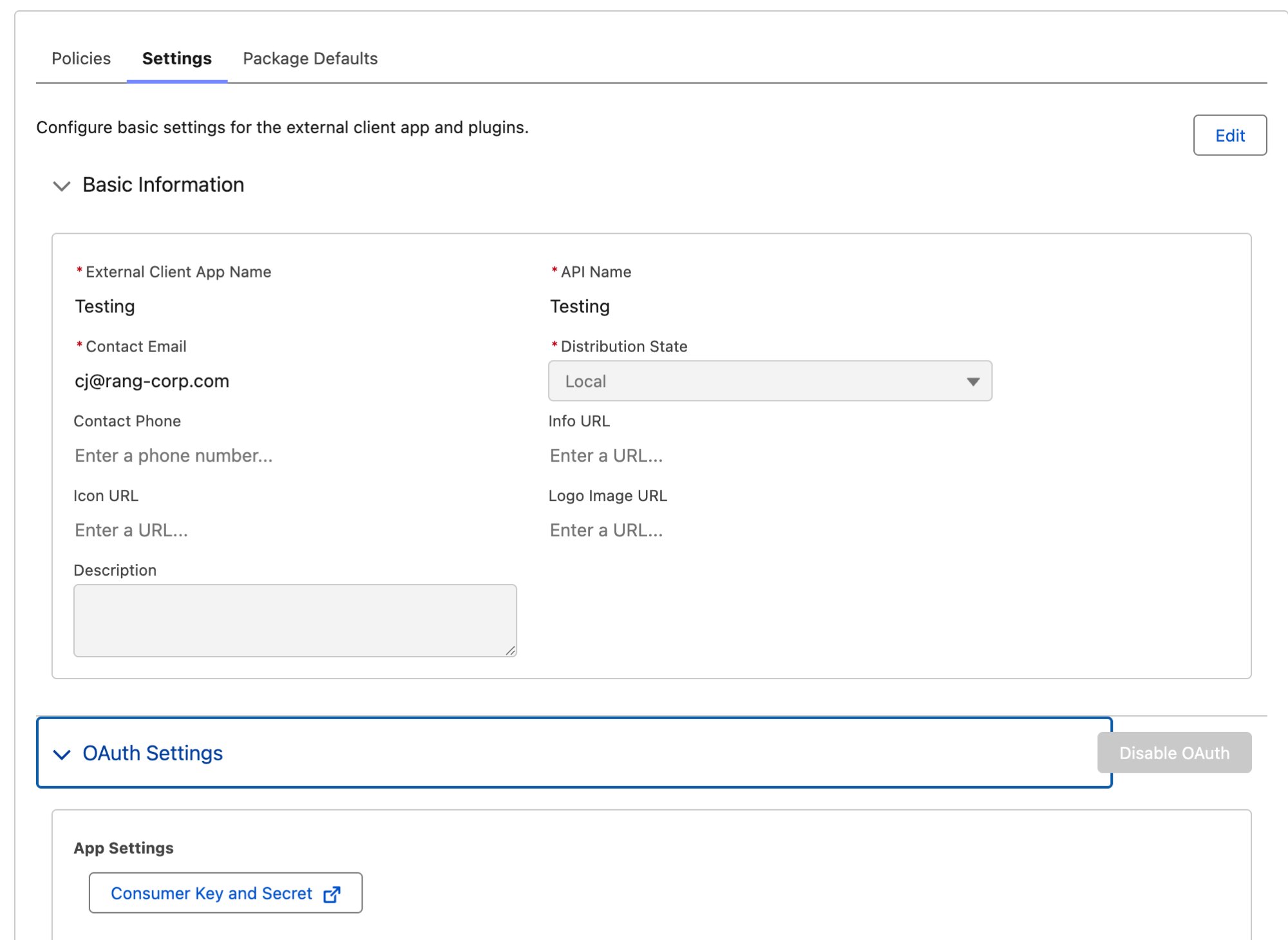
- You'll see the Consumer Key displayed immediately
- Click "Manage Consumer Details" to view the Consumer Secret
- Salesforce will send a verification code to your email — enter it to proceed
- Copy both the Consumer Key and Consumer Secret for use in RunReveal
Step 5: Connect in RunReveal
- Go to Sources in RunReveal
- Click the Salesforce Event Logs source tile
- Give it a name and fill in the required fields:
- Salesforce Instance Host: Your Salesforce instance URL (e.g.
company.my.salesforce.com) - Client ID: The Consumer Key from Step 4
- Client Secret: The Consumer Secret from Step 4
- Salesforce Instance Host: Your Salesforce instance URL (e.g.
- Click Connect Source
RunReveal will start polling within a minute and backfill the last 30 days on first sync. When new EventLogFiles show up still depends on Salesforce's generation delay (hours for Hourly, at least a day for Daily).
Video Walkthrough
Verify It's Working
The source starts polling within a minute. Event log files may not exist yet — see the delay above.
You can validate we are receiving your logs by running the following SQL query.
Troubleshooting
Missing event logs (or collection stopped)
If logs never appear, stop after working, or you see an error about Salesforce tables the user cannot see, the usual cause is the Run As user on the External Client App. Salesforce hides objects a user cannot read instead of returning a clear permission error. We did not need to change anything on our side for collection to stop — a profile, permission-set, or Run As user change on the Salesforce side is enough.
Confirm that user's profile (or permission sets) still includes:
| Permission | Needed for |
|---|---|
| API Enabled | Both Event Logs and Audit Trail |
| View Event Log Files | Event Logs (EventLogFile) |
| View All Data | Event Logs |
| View Setup and Configuration | Audit Trail (SetupAuditTrail) — required if the same app also feeds that source |
Assigning the Event Monitoring Analytics license or permission set is not enough. Those grant the prebuilt
CRM Analytics app, not EventLogFile.
If collection worked previously, check in this order:
- The External Client App's Client Credentials Flow → Run As user was reassigned.
- That user's profile, permission sets, or user license changed (including losing View Event Log Files or View All Data).
If one External Client App feeds both this source and Salesforce AuditTrail, its Run As user needs the permissions for both. Changing the Run As user or its profile to suit one source will silently stop the other, because a Client Credentials Flow has exactly one Run As user.
Event logs appear hours or a day late
That is Salesforce generating EventLogFiles, not a RunReveal outage. Hourly files typically take 3–6 hours. Daily files are unavailable for at least 1 day. See the polling callout above. If your org does not have the hourly Event Monitoring add-on, keep Polling Interval on Daily.
sObject type 'EventLogFile' is not supported
Salesforce returns this INVALID_TYPE error when the Run As user cannot read the EventLogFile object. The
wording is misleading — the object has existed since API version 32.0 and has not been removed. A missing
permission and a nonexistent object produce the same error.
Grant View Event Log Files, View All Data, and API Enabled, as described above and in Step 3.
Schema
The following columns are exposed for this source. RunReveal applies schema normalization across all sources, ensuring uniform field names and data types for cross-source queries and reusable detection logic.
Table: salesforce_logs (36 columns)
salesforce_logs (36 columns)| Column | Type |
|---|---|
workspaceID | String |
sourceID | String |
sourceType | LowCardinality(String) |
sourceTTL | UInt32 |
receivedAt | DateTime |
id | String |
eventTime | DateTime |
eventName | String |
eventID | String |
srcIP | String |
srcASCountryCode | String |
srcASNumber | UInt32 |
srcASOrganization | String |
srcCity | String |
srcConnectionType | String |
srcISP | String |
srcLatitude | Float64 |
srcLongitude | Float64 |
| Column | Type |
|---|---|
srcUserType | String |
dstIP | String |
dstASCountryCode | String |
dstASNumber | UInt32 |
dstASOrganization | String |
dstCity | String |
dstConnectionType | String |
dstISP | String |
dstLatitude | Float64 |
dstLongitude | Float64 |
dstUserType | String |
actor | Map(String, String) |
tags | Map(String, String) |
resources | Array(String) |
serviceName | String |
enrichments | Array(Tuple(data Map(String, String), name String, provider String, type String, value String)) |
readOnly | Bool |
rawLog | String |
Table: salesforce_login_logs (70 columns)
salesforce_login_logs (70 columns)| Column | Type |
|---|---|
workspaceID | String |
sourceID | String |
sourceType | LowCardinality(String) |
sourceTTL | UInt32 |
receivedAt | DateTime |
id | String |
eventTime | DateTime |
eventName | String |
eventID | String |
srcIP | String |
srcASCountryCode | String |
srcASNumber | UInt32 |
srcASOrganization | String |
srcCity | String |
srcConnectionType | String |
srcISP | String |
srcLatitude | Float64 |
srcLongitude | Float64 |
srcUserType | String |
dstIP | String |
dstASCountryCode | String |
dstASNumber | UInt32 |
dstASOrganization | String |
dstCity | String |
dstConnectionType | String |
dstISP | String |
dstLatitude | Float64 |
dstLongitude | Float64 |
dstUserType | String |
actor | Map(String, String) |
tags | Map(String, String) |
resources | Array(String) |
serviceName | String |
enrichments | Array(Tuple(data Map(String, String), name String, provider String, type String, value String)) |
readOnly | Bool |
| Column | Type |
|---|---|
rawLog | String |
eventType | String |
timestamp | String |
requestId | String |
organizationId | String |
userId | String |
runTime | String |
cpuTime | String |
uri | String |
sessionKey | String |
loginKey | String |
userType | String |
requestStatus | String |
dbTotalTime | String |
loginType | String |
browserType | String |
apiType | String |
apiVersion | String |
userName | String |
tlsProtocol | String |
cipherSuite | String |
useApiToken | String |
httpReferer | String |
loginUrl | String |
countryCode | String |
authenticationMethodReference | String |
loginSubType | String |
authenticationServiceId | String |
timestampDerived | String |
userIdDerived | String |
clientIp | String |
uriIdDerived | String |
loginStatus | String |
sourceIp | String |
forwardedForIp | String |
Table: salesforce_logout_logs (54 columns)
salesforce_logout_logs (54 columns)| Column | Type |
|---|---|
workspaceID | String |
sourceID | String |
sourceType | LowCardinality(String) |
sourceTTL | UInt32 |
receivedAt | DateTime |
id | String |
eventTime | DateTime |
eventName | String |
eventID | String |
srcIP | String |
srcASCountryCode | String |
srcASNumber | UInt32 |
srcASOrganization | String |
srcCity | String |
srcConnectionType | String |
srcISP | String |
srcLatitude | Float64 |
srcLongitude | Float64 |
srcUserType | String |
dstIP | String |
dstASCountryCode | String |
dstASNumber | UInt32 |
dstASOrganization | String |
dstCity | String |
dstConnectionType | String |
dstISP | String |
dstLatitude | Float64 |
| Column | Type |
|---|---|
dstLongitude | Float64 |
dstUserType | String |
actor | Map(String, String) |
tags | Map(String, String) |
resources | Array(String) |
serviceName | String |
enrichments | Array(Tuple(data Map(String, String), name String, provider String, type String, value String)) |
readOnly | Bool |
rawLog | String |
eventType | String |
timestamp | String |
requestId | String |
organizationId | String |
userId | String |
runTime | String |
cpuTime | String |
sessionKey | String |
userType | String |
requestStatus | String |
dbTotalTime | String |
browserType | String |
userName | String |
timestampDerived | String |
userIdDerived | String |
clientIp | String |
sessionLevel | String |
sessionType | String |
Table: salesforce_apitotalusage_logs (55 columns)
salesforce_apitotalusage_logs (55 columns)| Column | Type |
|---|---|
workspaceID | String |
sourceID | String |
sourceType | String |
sourceTTL | UInt32 |
receivedAt | DateTime |
id | String |
eventTime | DateTime |
eventName | String |
eventID | String |
srcIP | String |
srcASCountryCode | String |
srcASNumber | UInt32 |
srcASOrganization | String |
srcCity | String |
srcConnectionType | String |
srcISP | String |
srcLatitude | Float64 |
srcLongitude | Float64 |
srcUserType | String |
dstIP | String |
dstASCountryCode | String |
dstASNumber | UInt32 |
dstASOrganization | String |
dstCity | String |
dstConnectionType | String |
dstISP | String |
dstLatitude | Float64 |
dstLongitude | Float64 |
| Column | Type |
|---|---|
dstUserType | String |
actor | Map(String, String) |
tags | Map(String, String) |
resources | Array(String) |
serviceName | String |
enrichments | Array(Tuple(data Map(String, String), name String, provider String, type String, value String)) |
readOnly | Bool |
rawLog | String |
eventType | String |
timestamp | String |
timestampDerived | String |
requestId | String |
organizationId | String |
userId | String |
userName | String |
clientIp | String |
clientName | String |
connectedAppId | String |
connectedAppName | String |
apiClientCategory | String |
apiFamily | String |
apiResource | String |
apiVersion | String |
countsAgainstApiLimit | String |
entityName | String |
httpMethod | String |
statusCode | String |
Related Documentation
- Using Event Monitoring — Salesforce's EventLogFile delays (hourly 3–6 hours, daily at least 1 day)
- Query or View Hourly Event Log Files — Hourly EventLogFile generation and caveats
- Salesforce AuditTrail — Setup audit log source; same Connected App can feed both